Product - Pricing
Resources Partnership Contact
For media owners and DOOH networks
Sell audiences, not screen time
Your screens already have viewers. ScreenManager measures who they are and how long they look, and plays each spot to the audience it was bought for. Anonymous, on the device, GDPR and AI Act compliant.





What you can sell that a loop cannot
A small camera on each display turns screen time into measured, targeted audience time. Advertisers pay for reach they can see.
Audience-targeted spots
A campaign bought for young adults plays when young adults are in front of the screen, not at 10:40 because that is where it sat in the loop. Rules are set per campaign in the web editor.
Impressions you can prove
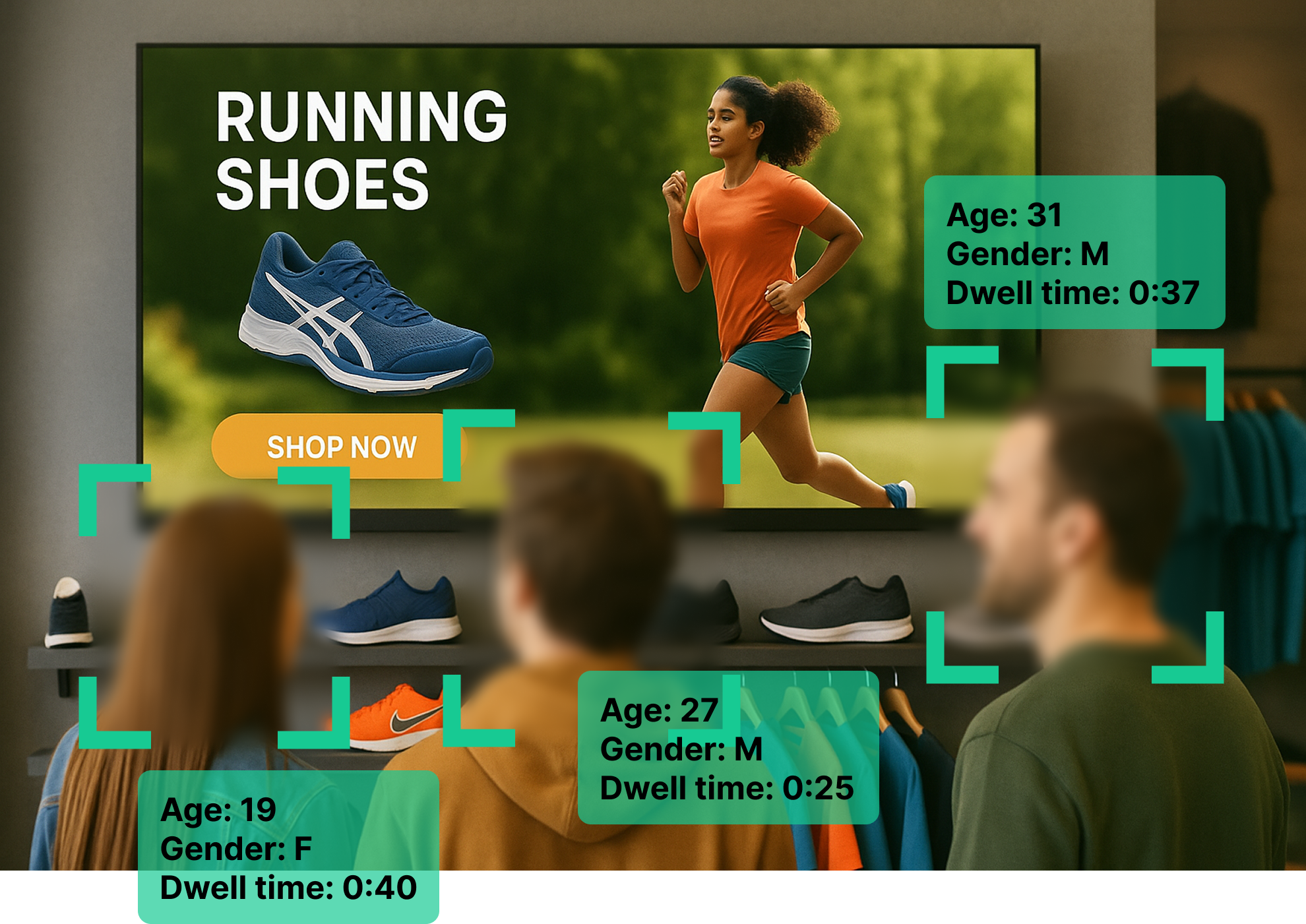
Passers-by, viewers, dwell time and attention per screen, per campaign and per hour. Numbers an advertiser can put straight into their own report.
Proof of play and proof of audience
Playback logs paired with audience counts for the same minutes, so one report shows what ran and who was there to see it.
Privacy that survives legal review
Detection runs on the player. No images or video leave the device and nothing identifies a person. GDPR and AI Act compliant, which shortens the conversation with a brand's legal team.
Analytics for the advertiser's report
Every number is measured on the device and available per screen, per campaign and per advertiser, in the dashboard or exported.
- Foot traffic
- How many people passed each screen, by hour and by day.
- Viewers and attention
- How many of them looked at the screen, and how the share changes with the content.
- Dwell time
- How long they stayed, per spot and per campaign.
- Demographics
- Age groups and gender of the audience, as anonymous counts.
- Peak hours and heatmaps
- When and where the audience is, so inventory is priced by reach rather than by slot.
- Real-time alerts
- Notifications on significant engagement events, and on a screen that stopped playing.
From camera to report
- 1
Fit the camera
A small camera on or next to each display. The player processes everything locally, so no extra server and no video stream.
- 2
Define audiences
Age groups, gender, attention, objects or gestures, set as rules in the web editor. No programming.
- 3
Run campaigns
Each spot keeps its schedule and, when a rule matches, plays to the audience it was sold for. The rest of the loop runs as before.
- 4
Report
Plays, viewers, dwell time and demographics per advertiser and campaign, from the dashboard or as an export.
The camera, and which screens take it
Every display in your network can get audience detection. Which camera depends on what runs the screen; in both cases the detection runs locally and no video leaves the site.
USB camera on the player
For any Linux, Windows or Android-based display or player. The camera plugs into the device that already drives the screen and the player does the detection itself.
- Works with Android displays such as ViewSonic, Android players, Windows and Linux PCs and Raspberry Pi
- Standard USB camera, mounted on or next to the display
- No extra device, no extra network configuration
External AI camera over the local network
For displays from other manufacturers, such as Samsung Tizen or Sony Bravia, where nothing can be plugged into the screen. A small AI camera unit does the detection and talks to the player over the local network.
- Supplied by us, with the detection model on board
- Connects to the display's player over your local network, not the internet
- Same analytics and triggers as the USB option
Either way the video is processed where it is captured. Only anonymous counts and events reach ScreenManager.
Built to run a network
Monitoring and alerting
A screen that goes dark is flagged to you before an advertiser notices.
Remote power control
Displays switch off and on by schedule over HDMI-CEC, which cuts energy costs across the network.
Workspaces per site or advertiser
Separate environments and user permissions, one login for your operations team.
API
Connect your booking and reporting systems instead of copying numbers by hand.
Kiosk lockdown
Players in public places stay locked to the signage app.
Any display
Samsung Tizen, Sony Bravia, ViewSonic, Android, Windows, Linux and Raspberry Pi, so the screens you already run stay.
Pilot offer
Run one site for 90 days
Pick a site, keep the rest of your network as it is. After three months you know what your audience looks like, what a targeted campaign did, and what the numbers are worth to your advertisers.
Start a pilot- Cameras for the screens at one of your sites, USB or external, fitted with you
- One real campaign set up with audience rules in the web editor
- 90 days of audience analytics next to your proof of play
- A report at the end you can show an advertiser, and a price for the whole network
Let's talk about your network
Tell us how many screens you run and where, and we will get back to you within one business day. Here is what to expect:
- A 30-minute call about your network, your advertisers and pricing
- A proposal for the 90-day pilot at one of your sites
- A written offer within a few days

- [email protected]
- +420 604 487 886 (WhatsApp)
VAT: CZ08543682
Kurzova 2222/16 155 00
Prague, European Union